The Sign in with Apple sheet comes up, the user taps Continue and passes Face ID, and then the sheet fails with "Sign-Up not completed", also reported as "Sign Up not completed". The flow fails without a useful error payload: in the reported cases nothing actionable reaches the authorization delegate, and the console has nothing useful in it.
The fix that worked for us, after everything else failed, was to disable and re-enable the Sign In with Apple capability on the app's bundle ID (remove the capability and add it again, in Apple's portal). In the Apple Developer portal, open Certificates, Identifiers & Profiles, go to Identifiers, select your App ID, uncheck Sign In with Apple, save, then check it again and save. Regenerate your provisioning profiles if your setup does not manage them automatically. Every visible setting can already be correct and this still fixes it.
The fix, step by step
- Sign in at developer.apple.com and open Certificates, Identifiers & Profiles.
- Click Identifiers and select the App ID that matches your app's bundle ID.
- Confirm the Sign In with Apple box is checked at all. One developer in the main Stack Overflow thread found Apple had unchecked it on its own.
- Uncheck Sign In with Apple and save.
- Open the same App ID again, check Sign In with Apple, and save.
- Regenerate the provisioning profiles for that App ID, or let Xcode's automatic signing pull fresh ones. Editing an App ID's capabilities invalidates its existing profiles, so you need new ones before the next build.
- Rebuild and try the sign-in again.
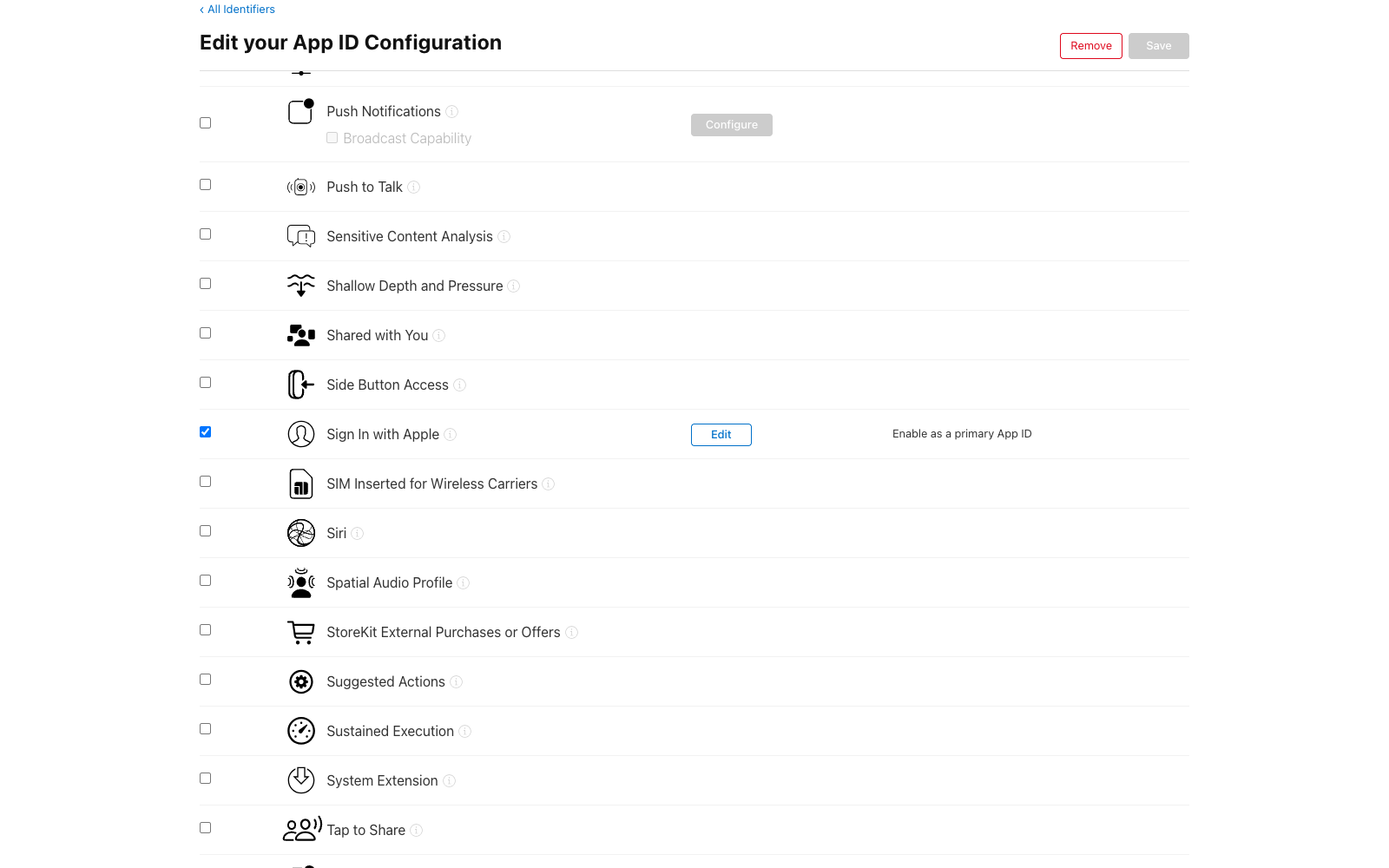
The capability row on the App ID's edit page. This checkbox, not the one in Xcode, is the one to toggle.
Toggling the same capability inside Xcode's Signing & Capabilities tab did nothing for us, and a Stack Overflow answer reports the same. The reset only counts when you do it in the portal.
What we tried that did not work
We lost most of a day here. In the order we burned time:
- Checking the entitlements file.
com.apple.developer.applesigninwas present with theDefaultvalue, andcodesign -d --entitlementsshowed it in the built app too. It was correct the whole time. - Toggling the capability in Xcode. Removing Sign in with Apple under Signing & Capabilities, cleaning, and adding it back changed nothing, which makes sense in hindsight given the portal note above.
- Auditing keys and Services IDs. We re-checked the Sign in with Apple key and the Services ID our backend uses for token validation. Both were fine. Our backend never logged a request at all, because the app never got a credential to send it.
- Waiting. One answer says the error sometimes clears on Apple's side within two days. We waited overnight. Ours did not clear.
Why this works, as far as we can tell
We cannot tell you the mechanism, and we are not going to invent one. The sheet shows no error code and Apple does not document this failure. When these reports come up on the developer forums, Apple's engineers ask for a Feedback Assistant submission with your Team ID and sysdiagnose logs rather than pointing at a known cause.
What we can say is narrower. Every setting we could inspect was already correct, and the one action that changed anything rewrote the capability association on Apple's side. Somewhere behind the App ID record, that state can get stuck. Unchecking and rechecking the box forces Apple's systems to write it fresh, and for us that was enough.
It is not a guaranteed fix. In the Stack Overflow thread above, one developer's case ended with Apple confirming the failure "was caused by an internal data feed sync operation" and fixing it server-side. Another traced it to bad back-end data on their Apple account, and getting that repaired took a technical support request and just under three weeks. If the toggle does not clear your error, that is the escalation path: file the Feedback Assistant report, then open a support case.
One variant worth knowing about. If you hit this error in the web or REST flow rather than the native sheet, check your query encoding first. An Apple engineer traced one report to plus signs instead of percent-encoded spaces in the authorize URL.
Letting an agent run the checklist
The whole fix is portal clicking plus a profile refresh, which makes it a natural thing to hand to an agent. Lance's App Manager is an App Store Connect operator that coding agents talk to over MCP. An agent with the Lance MCP connected can call get_account_health first, which takes seconds and rules out account-level blockers like pending agreements or an expired Apple ID session before anyone blames the capability. It can then delegate the reset in plain language through ask_app_manager: name the bundle ID, describe the "Sign-Up not completed" symptom, and ask the operator to check the Sign In with Apple capability, toggle it off and on, and regenerate the provisioning profiles. The operator works with your team's real App Store Connect access and reports back what it found and what it changed.
If the automated toggle does not resolve the error, do it manually in the portal as described above, and escalate to Feedback Assistant if it survives that too.
To connect Lance to your coding agent, run npx add-mcp https://api.lance.app/mcp, or see the install guide.